Monday, 4 July 2016

AND... THIS IS THE FINAL BADGE!


Name: Maite Guerrero Mota
Course: Open eTwinning (1st edition) - Twinmooc
Owner of this badge participated in MOOC INTEF ´Open eTwinning (1st edition)´. Edition May 18th – June 29th 2016. Competences: he/she knows and manages the basic tools of the eTwinning platform; analyzes his/her own teaching practice, detects aspects which might be subject to improvement and decides where and when implement innovative methodologies; he/she applies concepts of educational innovation to project planning and designs eTwinning collaborative projects.


Monday, 27 June 2016

FINAL THOUGHTS

In this final step, I'm going to reflect about the following questions:
  1. What have I  learnt from the course?
  2. What are the positive aspects of the MOOC?
  3. What are the negative aspects of the MOOC?
  4. What would you suggest to improve it?
    I have learnt a lot of things from this MOOC. The steps to follow when carrying out an international project, what is taken into account (according to the rubrics). I have also learnt different tools to use when collaborating in a project. I have seen how the eTWINNING platform works.
    I like the MOOC experience because it is an online course and you can work at your own pace. You can have your peer's opinions and get inspired by other projects. There are also a lot of resources where you can find information.
    Some of the negative aspects... Maybe there are a lot of projects still to be seen and I didn't have time to read them. I still have to find a way to classify the different ICT tools and which one is more useful for the different tasks I want to do. At the very beginning, I was a little bit lost. It was my first time doing a MOOC and at the same time I sometimes felt overwhelmed by the work to do and doing it at the end of the course has been a little bit difficult. But, in the end, I achieved it and  I liked the experience very much.
    I liked very much the MOOC, if I have to say something, I think peer assessment is useful but sometimes it was difficult to assess some projects and  when I was assessed I think that some parts of my project were misunderstood. I would have liked to explain it better.

    Thank you for this MOOC and your support and I hope to find some partners to carry out this project in the future.

UNIT 5: MY PROJECT PLAN


KNOWING EACH OTHER!


COLLABORATIVE PROJECT PLAN (MOOC OPEN ETWINNING)


Project’s name: Knowing each other!
Students’ age: 13-14 years old
Group work: Students work in groups of 4-5 students from 3 /4  European schools
ICT tools to be used:
Teacher tools: google calendar, drive, twinspace tools (forum, project diary, e-mail,...), skype, google forms.  
Student’s tools: powtoon/wevideo, prezi presentations, google forms, pictures and drawings, fotobabble, web publishing (weebly, wiki), padlet.
Language: English
Subjects: History, Geography, ICT, English
Project duration: 3-4 months
DESCRIPTION OF THE PROJECT
In this project students will be able to give personal information to meet other people, talk about their schools and give information about their city and region (climate, geographical situation, places to visit in their city, typical food and the most typical festivities). 
This is is part of the curriculum of a foreign language. But apart of it, we are also working  with  other areas. 
  In order to carry out this project they will use different ICT tools which will allow them to use the four skills (listening, speaking, reading and writing).
The students in this way will learn about different cultures and will share information about their countries of origin.
GOALS
  • Encouraging students to speak English in a communicative way.
  • Working with the four skills: listening, reading, speaking and writing
  • Sharing information about their cultures, promoting respect and finding how diversity enriches a person.
  • Increasing student’s knowledge about different cultures.
  • Working in groups promoting collaboration and respecting each other’s ideas.
  • Developing digital skills.
WORK PROCESS
1- Meeting my partners.
Students’ introduce themselves, talk about their hobbies and interests and their schools. They ask and answer questions to their partners establishing communication between them.
MY E-ACTIVITY
Group activity: 4-5 students
Language: English
Subjects: English/ICT
Objectives.
- Establishing communication with people from other countries using English as the main language.
- Developing student's creativity using  ICT tools.
- Evaluating each other's work using ICT tools.
- Working with different skills: listening, speaking, reading, writing.
- Respect and understand other cultures.
- Working in a  collaborative way.


Procedure:
- Students in group of 4/5 students create a poster (using glogster) and a video about themselves talking about each other, their hobbies and interests and their school.
- They iwill also nclude questions they  want to ask to their peers at the partner school.
- Their peers will also send a poster and a video about themselves. They will also include answers to their peers’ questions and some questions for them.
- Students will use padlet to evaluate their partner's posters and oral presentations. Teachers will provide a rubric for this purpose.
Students and teachers will be in contact using, facebook, twitter, e-mails, forums, twinspace, etc.


2- Where we live
Students from each country prepare the kind of questions they would like to know about their partner’s city. After taking into account their partners’ interests, they prepare a presentation about their city. They will use images, music , etc. They will use prezi for this purpose.


3. Typical food.
Students prepare a video of the most typical food in their region and they give instructions of a typical recipe so that their partners have to be able to cook it following the instructions. .
4- Culture and traditions
Students using fotobabble create a collage with pictures and some information of typical traditions, festivities.


At the end each country will prepare a quiz to test their partners (they can use google forms or surveymonkey). A short article about the whole experience will be also published. All the information of the project will be gathered in a wiki where the different members can write collaboratively.


Expected results 
- Promoting work in groups.
- Getting familiar with other countries’ traditions and cultures.
- Developing and improving  English Language skills
- Developing and improving digital skills.
- Creating a wiki as a summary of the whole project and the experience.


Evaluation 
- Peer evaluation (quiz with questions) made by students.
- Teachers’ evaluation using rubrics. 
- Final evaluation of the whole project.The teacher will ask different questions about the different countries involved in the project.

Wednesday, 22 June 2016

UNIT 5: THE eTWINNING SOCIAL NETWORK

In this unit we have to explore the social dimension of eTWINNING.

This is the webpage where we can find self-teaching materials about eTWINNING.

Twinspace tutorial

eTWINNING live

Here are all the materials used by our partners in the platform

These are the opinions and pages created by all the partners

We also gave our opinion, 3 aspects we liked about the platform and one we disliked.
Three aspects I liked:
1- I like the idea of working collaborating with people from other countries. It can motivate and help teachers and students to learn a new language.
2- I liked learning about new ICT tools that I can use in my teaching practice.
3- The Twinspace is safe and easy to use for students.

Aspects to be improved:
- It is difficult for me to classify all the ICT tools used and see which one is the most appropiate for the task. There are a lot of projects to revise!
I can't mention anything about the platform because I haven't used it a lot to mention what it needs to be improved. 


Tuesday, 21 June 2016

UNIT 4: COLLABORATION IN eTWINNING

In this unit we have to design an e-activity for the project. At the same time, we will also evaluate 3 other partner's activities.

My e- activity  is called Meeting each other.

Group activity: 4-5 students
Language: English
Subjects: English/ICT

Objectives. 
- Establishing communication with people from other countries using English as the main language.
- Developing student's creativity using  ICT tools. 
- Evaluating each other's work using ICT tools.
- Working with different skills: listening, speaking, reading, writing.
- Respect and understand other cultures.
- Workin in a  collaborative way.

Procedure: 
- Students in group of 4/5 students create a poster  and a video about themselves talking about each other, their hobbies and interests and their school.
- They include questions they  want to ask to their peers at the partner school.
- Their peers will also send a poster and a video about themselves. They will also include answers to their questions and some questions for them. 
- Students will use padlet to evaluate their partner's posters and oral presentations. Teachers will provide a rubric for this purpose.
 They will also have a google questionnaire to evaluate the experience.

Students and teachers will be in contact using, facebook, twitter, e-mails, forums, etc.

Evaluation 
- Creativity in poster and video creation.
.- Use of the language (accuracy, fluency, pronounciation,... )


Monday, 6 June 2016

UNIT 3: PROJECT DRAFT


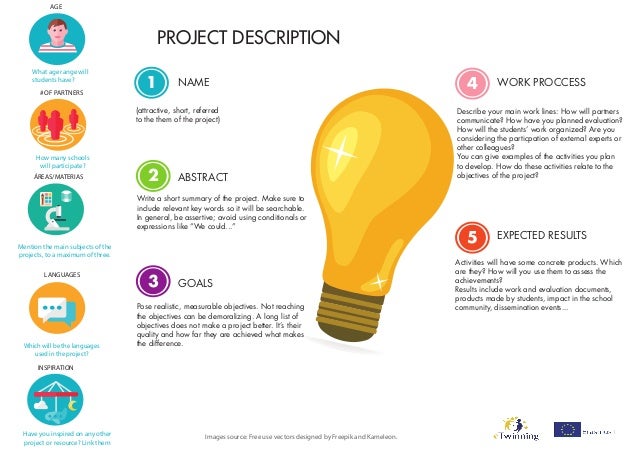
 In this unit we have to design the draft of the collaborative project we expect to launch in the future. In order to carry out this task we need to take into accont the following aspects:


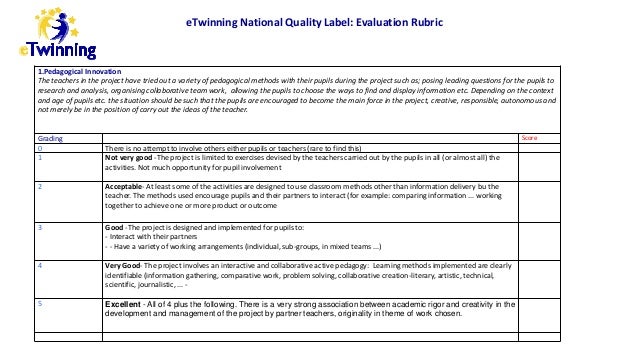
Other colleagues will give us feedback to improve our draft so that we can modify and extend it. Moreover, I will also assess anonymously the drafts of three other colleages. For this purpose we have a rubric. 

I have some doubts since I have never worked using projects and I think I also need to improve  the assessment section, but I hope that my colleagues will help me with ideas in order to make the necessary changes. 


Monday, 30 May 2016

UNIT 2: INNOVATION IN THE CLASSROOM

In this unit we have reflected about our teaching practice trying to answer the following questions:  

1- What can I improve?
I would like to improve and incorporate more  the use of ICT tools in my teaching practice in order to motivate and engage students to communicate in English.
At the same time, I want to improve my teaching through  new methodologies and practices.
I also need to know how to evaluate the use of digital tools and projects.
2- What I would like to try?
I would like to learn about the use of projects in which students and also teachers collaborate, cooperate, share, create new things using ICT tools and the English language.  At the same time, I would also like to promote some values like responsibility, friendship, collaboration, respect, etc.
3- What am I not happy with?
I'm not happy with the wide curriculum we have.
The difficulties I find when trying to use ICT in the classroom due to the poor internet connection we have.

These reflections will lead us to try to search for collaborative educational projects or tools that can help us in order to respond to our needs and objectives. 
For this reason, we had a list of resources where we can find projects as well as useful  tools. Toolbox 1 / Toolbox 2
One of the tools that I find useful in the English class is Vocaroo and I added it to the #twinmooclist
 What projects have I found that might help me? I need to improve my digital skills and I would like to start with an easy, short term project and see how it works. I found some interesting projects: All about us and Welcome to my marvellous city e-book